[70Decibels - Generational - 049 - Journaling with Paul Mayne](http://www.70decibels.com/generational/2013/8/27/049-journaling-with-paul-mayne.html)
As a big user of Day One (and a tinkerer of some plugins for it), I really enjoyed this conversation.
- that serendipitous rediscovery of a memory
- my son could use pictures of mom and dad for a surprise anniversary party
- not sorting through dozens or hundreds of photos from the same event to find a good one
- the video I shoot is discoverable
- it’s possible to find a photo of a person from a location even though I don’t exactly remember when I took it
- browsing photos is pleasant despite there being gigabytes and gigabytes and gigabytes of them, from different catalogs and sources
- What’s going on here at the image at the top?
- Girl or boy?
- How old?
- What’s the time of day?
- Time of year?
- Hot or cold?
- Modern or antique?
- Sunny or cloudy?
- Indoors or out?
[Some Stuff from Amazon that Wasn't Crap](http://www.macdrifter.com/2013/08/some-stuff-from-amazon-that-wasnt-crap.html)
One thing I like about Gabe’s list is that it’s not entirely tech stuff. Nice wheelbarrow!
[On leaving academic life – Rethinking Markets](http://www.rethinkingmarkets.org/2013/08/23/on-leaving-academic-life.html)
I haven’t really remarked here, or anywhere for that matter, on my transition from academia. Maybe one of these days, but for now Peter Levin pretty aptly describes the why:
Some years ago, for the Columbia pro-seminar, I produced a year-by-year ‘getting through graduate school’ handout. In my little pitch to 1st years, I told them that each year, including your terminal, job-hunting year, you should take stock of your sunk costs, and ask yourself if you still want to be an academic. For me, the answer became no. And for me, like many of graduate students, as well as tenured and untenured faculty, the biggest question was, if not academia, then what else?
Peter has landed what sounds like a fantastic gig with Intel, as a “sociologist in the wild,” and I’m looking forward to hearing about his acclimatization to Portland’s environs. Happy trails!
[Editorial Workflow — Insert browser URL as link](http://editorial-app.appspot.com/workflow/4541326620098560/n1ym7Y2709Q)
Okay, it’s my second workflow, but the first (which rebuilds this site) is not really publish-ready.
Grab the current URL from the Editorial browser and insert as a markdown link in the current document. Opens a prompt for the link text with the default set to the current editor selection.
Storing things is easy
This week’s episode of Accidental Tech Podcast continues discussion that I have really appreciated, motivated in part by Bradley Chambers’ post on the state of photo management in iOS. The followup conversation this week begins with John Siracuasa’s good-so-far experience with Everpix, and focuses mostly on the dilemma of reliable and accessible backups of one’s photo collection.
Over the years I have accumulated a series of increasingly-large external hard drives that perform both backup of my active data as well as offline storage and its backup (offline storage being for the stuff, almost exclusively photos, that I moved from primary storage to free up more space). I have had an array of backup regimes including wirelessly mounting these external drives for incremental backup using a terribly fiddly launchd+ unison and later rsync script, which turned out to be fiddly enough and require enough babysitting that I stopped doing it altogether and now rely on somewhat randomly scheduled cabled backups. In addition to these, I have backups from various points in time to cloud destinations like Strongspace and Box.net and utterly gobs of pictures at Flickr and Facebook. (Also Trovebox where I spent some time last year. You get the point.)
I have and will continue to pay good money for the desk- and cloud-based boxes that hold my stuff. Problem is, perhaps in contrast to the ATP conversation, the boxes might be too easy. I’m not suggesting that making Time Machine/Capsule work flawlessly is easy, or that most upload bandwidth allows for efficient creation of comprehensive cloud backups; but what’s easy is filling up platter after platter with data. To be sure, as a general area of computing, not having backups, or not having backups that work are substantial problems (how many of us have tested our backups or could actually perform a restore from them to rebuild a working boot disk?).
But as space gets cheaper and services proliferate, the boxes of disks become for me a minority concern and even exacerbates the problem of retrievability. More important is knowing what I have, and perhaps this is the difference between backup and archiving. I think the real problem in twenty years probably won’t be having my stuff around but using it well, by which I mean:
Some of this is a problem of discipline: and if I were just more diligent about keywording and filing taxonomy then perhaps this would be easier. But it’s also a problem of scale: Files not only keep getting bigger but we are making massively more of them every year. And unlike the storage element, the problem of scale isn’t getting easier, and won’t get easier without next-gen advances in tools that help with navigating and understanding the content of our photos.
In short, finding what I’ve stored is hard, and it’s made harder by the passage of time, the shifting of things offline as new content gets bigger than always-on capacity, and the arrival of new platforms and devices.
Going back to the beginning, I’m considering Everpix myself not for backup purposes but because they seem to take this quite seriously
It has become easier and easier to take pictures of everything, but technology to manage them has not progressed much. Photographs capture precious memories and emotions, yet a computer stores them as files and bits. Effectively, we, the users, are the only ones for whom these images still have a meaning. Maybe not for long: as photos accumulate by the hundreds, or thousands, on our phones, memory cards, hard drives or social networks, the cost of collecting, organizing, and managing them becomes so high that we also lose touch with these captured memories. Our memories could, ultimately, end up forgotten on some computer memory.
So why am I holding back? My primary reservation is about having Yet Another Service holding my stuff. Everpix would be an easy, no-brainer buy for me if it could do what they offer on my desktop — or my own storage, wherever it is — without requiring me to send them all my stuff. But at the moment maybe that’s the price for (part of) what I ultimately really want.
[Editorial for iOS](http://omz-software.com/editorial/)
On the sofa with the iPad, checking out Editorial. It really is all that and a bag of chips, so far: a really nice markdown writing environment with a crazy crazy powerful scripting platform built in.
I wrote this post in Editorial and then used a short python script to publish and rebuild the blog, all right here within the Editorial interface. (Thanks to Gabe for his FTP upload script from which I cribbed the keychain module usage.)
Hot.
[Pop Culture Happy Hour](http://www.npr.org/templates/story/story.php?storyId=129472378)
I’ve become a big fan of NPR’s Pop Culture Happy Hour. It’s casual but also focused, so the discussion never gets lost in a lot of banter or insider-ness. Recent episodes have featured San Diego Comic Con, Orange is the new Black, fall TV, and Doctor Who. The show often features familiar voices from other NPR programming, and it’s fun to hear them outside of their normal context.
VSCO + Fujifilm X100S
I sprung for the VSCO slide film pack while it was on sale for its recent launch, and I’m enjoying experimenting with it. Having not grown up shooting film I don’t have expectations for certain looks from the presets, and the sheer number of options is somewhat overwhelming. There’s a huge amount of variety in the array of film styles. Below are a few I’ve liked so far, compared to an out of camera JPG from the X100S:
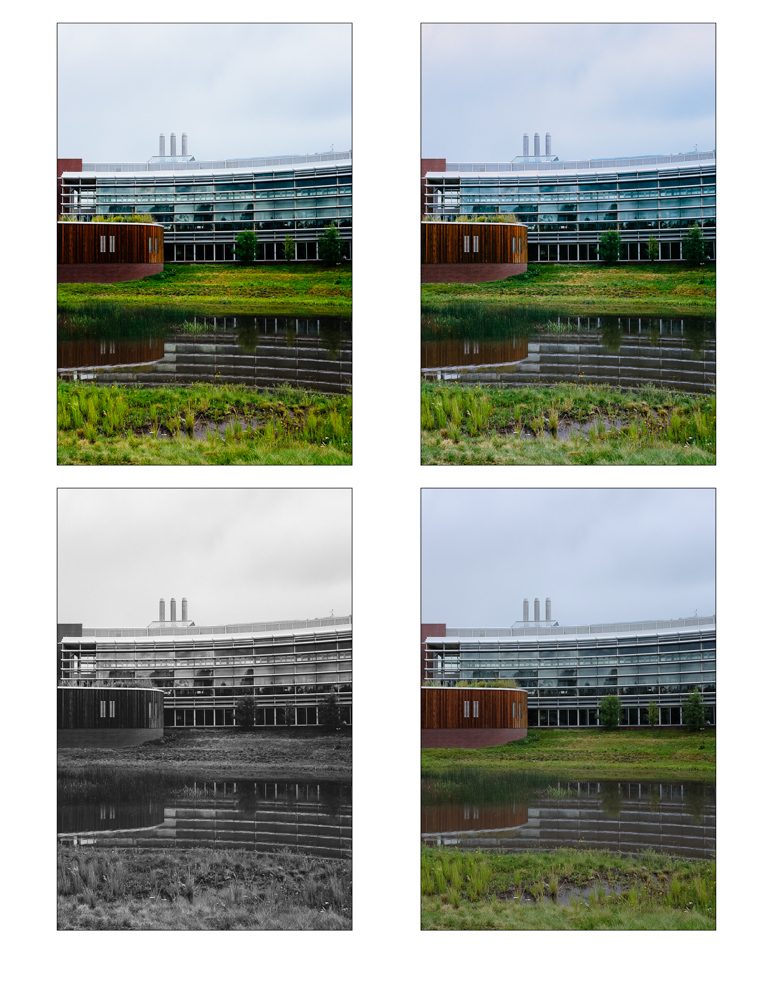
clockwise from top left: Fuji Velvia 100F Landscape; Fuji Provia 100F +; Pro Neg. Hi SOOC; Agfa Scala 200 ++
Patrick La Roque has a bunch of inspiring examples of VSCO Film 04 in use.
[Exiftool | Diving Into x-Pro1 and X100 Metadata](http://www.laroquephoto.com/blog/2012/7/12/exiftool-diving-into-x-pro1-and-x100-metadata.html)
Patrick La Roque had exactly what I was looking for this morning: A quick discussion of using exiftool to get detailed EXIF data from Fuji X100/X100S JPGs. I’d love to figure out a good way to automatically pipe the film mode detail back into a Lightroom keyword for those out-of-camera JPGs that I keep; maybe I’ll make that a project for next weekend or so.
Telling stories

Robert Boyer seems unfairly prolific at the photography-writing thing. I cribbed from his post about Fujifilm X100S settings and found his tips a great starting point.
Another influence was a forum discussion about telling stories through photos; that thread (dpreview?) is lost to me now — should have saved to pinboard — but a google search led me to another of Boyer’s recent posts, Fuji X100S - Story Telling Device:
If we bottom-line this whole photography endeavor the entire exercise boils down to telling a story. With all the pigeon-holed genres the one thing in common is that inside each an images success or failure is ultimately based on how effectively it tells a story or maybe part of a story.
This is so key. Debates over bokeh and pixel-peeping, smeared foliage and focus speed (all weighed against price and/or status as a “real” camera/photographer) fill the internet with noise but so often the technical details leave out the quality of an image to tell a story.
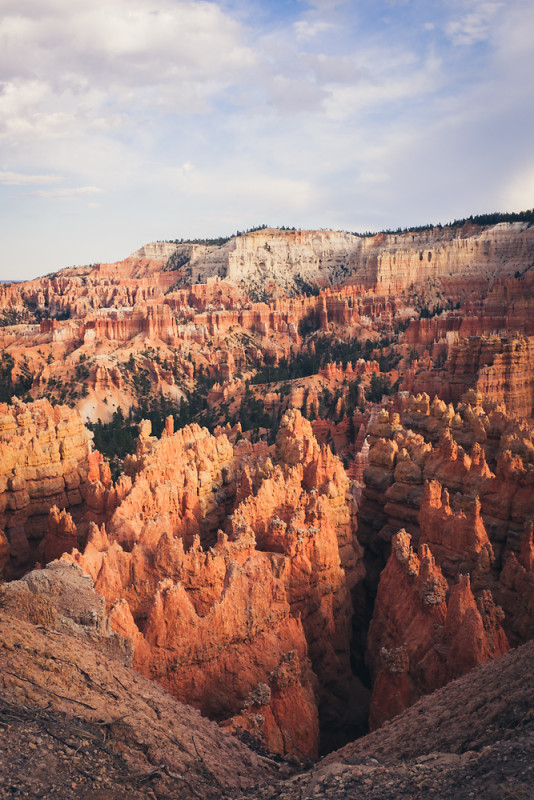
I won’t claim to be any good at this, but I’m trying to keep this all in mind.
So. We went on vacation the past week or so, road-tripping through southern Utah and on up to the Salt Lake City area, and man I shot a ton of photos. At one point in Bryce Canyon, stopping to shoot every hundred feet or so along a trail winding up the rim of an amphitheater, I self-consciously noted that I really didn’t have any idea what would make one of these photos better than the others. Deepening sunset was changing the light, and as we walked our angle changed, too. I made some in black and white, did some panos, experimented with depth of field and persuaded my exasperated wife to stand for just a few more portraits against the canyon background.
(A note on black and white: There’s a lot to love about the out-of-camera JPGs from the X100s. The great flexibility I get from shooting in JPG+raw is that I can work up a raw image if I don’t like the JPG so much; and if I shoot a black and white JPG and start to wonder what it looks like in color, well there’s the raw.)
(But, and this aside is becoming less of one, using film modes such as the BW setting gives me a valuable intent. This one’s black and white I tell myself and the X100S chimps at me to prove it after I click the shutter. The same goes for the other film mode settings: Great sunset, let’s try it in Velvia, etc. I’m eager to get those full-size JPGs off the card to see how they match my vision at the time and my intent with the film mode. Thinking about those film modes becomes part of the telling of the story — If I have the presence of mind to compose it, of course.)
In his post, Robert Boyer lists a handful of storytelling questions to ask of his photos, and I love how detailed he gets in this inventory:
So anyway I’m thinking as I take photo after photo of this spectacular landscape something to the effect of “I don’t know what will make this one of the tree more interesting than this one with just the hoodoos, so I’ll keep shooting lots.” Later, in Lightroom, comes trying to filter the photos and look for some keepers with questions like:
How did we get way up here? What’s it feel like to stand in that spot? Can a photo hint at the smell of rain way out there? (Also: Am I focused where I want to be? Should I adjust exposure? DOF?? Was that lightning? The signs at the trailhead said to get the hell off the ridge if there’s lightning.)
I think the point as I do this more is to try to front-load the picture-taking itself with those questions (the same way that using a film mode begins to hint at the intended effect of a photo), and then compose the photos accordingly. But one step at a time, right?
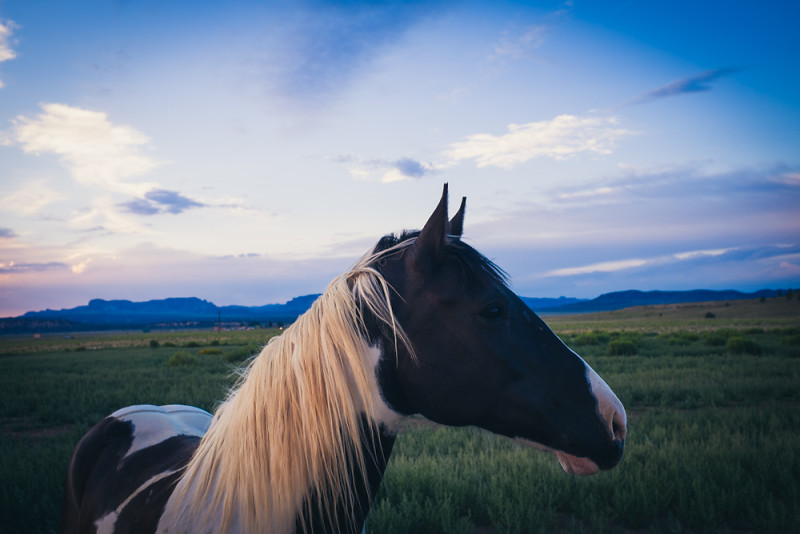
After all that, did I get a story? Well hell, hard to say. I do know that I really love trying. Right now, figuring out the balance of right technical elements and narrative components of the photo is just a great ball of fun.
administrivia
Did you notice you can click the images in this post to bring up a lightbox view of all the images from the post? It’s something I’m trying out, using the lightview toolkit.